Selecting Data for Node Inputs
In puq.ai, you can dynamically feed data from previous steps into a node’s input fields.
This allows workflows to react to real execution data instead of relying on static values.
Data selection is visual, contextual, and available once the workflow has been executed at least once.
When Can You Select Data?
To select data for an input field:
- The workflow must have been executed at least once
- The execution must reach the node where you want to use data
- Execution data must be available up to that point
Once this condition is met, puq.ai exposes execution data directly inside the input field.
How Data Selection Works
Step 1: Click on an Input Field
Open the node and click on any configurable input field.
If execution data exists, a data selector panel appears next to the input.
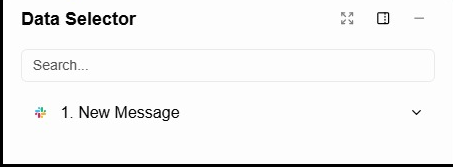
Step 2: Choose a Source Node
The data selector lists all nodes that have produced data so far, including:
- The Trigger
- Any previous nodes in the workflow
Each node represents a possible data source.
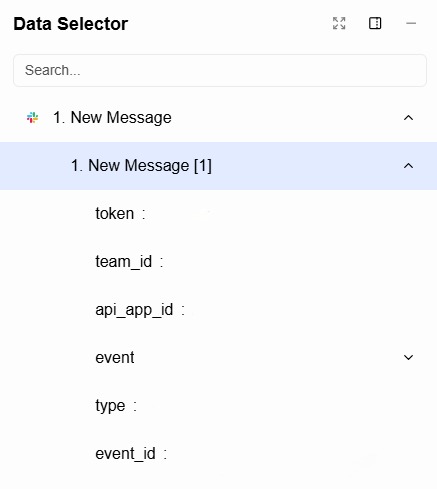
Step 3: Select a Field
After selecting a node, its available output fields are displayed.
These fields may include:
- Primitive values (string, number, boolean)
- Objects
- Arrays
- Nested structures
The available fields depend entirely on what the selected node returned during execution.
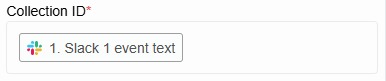
Step 4: Use the Selected Data
Click the field you want to use.
The selected value is now mapped into the input field and will be dynamically resolved during execution.
From this point on:
- The input updates automatically per execution
- The value comes from live workflow data
- No hardcoded values are required
Working with Complex Data
Some node outputs may include:
- Arrays of items
- Nested JSON objects
- Optional or conditional fields
In these cases, you can:
- Select the entire structure
- Select a specific nested field
- Combine or transform data later using parameter mapping
More advanced data manipulation is covered in dedicated sections.
Important Notes
- Data selection is execution-based — it depends on real run data
- Each execution has its own isolated data context
- If a node has not run yet, its data will not appear
- Input mapping does not modify the original data
Why This Matters
Using execution data in node inputs enables:
- Dynamic and reusable workflows
- Clean automation logic without duplication
- Reliable integrations with APIs and external services
- Easier debugging and validation
This mechanism is the foundation of flexible automation in puq.ai.
Summary
- Click an input field to open the data selector
- Choose a source node (trigger or previous node)
- Select the desired output field
- The data is dynamically injected at runtime
Understanding how to use data in node inputs is essential for building powerful workflows.